
Document automation · Azure AI
Automated invoice extraction with Azure
Automate the processing of PDF invoices to produce structured, usable data that can be integrated directly into management, control or reporting tools.
Business context
In many organisations, invoices arrive as PDFs and must then be reviewed, re-entered or reformatted before they can be used. This work is repetitive, time-consuming and prone to error, especially when formats vary by supplier, geography or billing practice.
The challenge is therefore not simply to read a document, but to turn unstructured content into usable data that is consistent enough to be checked, consolidated and reused.
Challenge
How can an incoming document be turned into reliable, structured and ready-to-use data without relying on systematic manual entry?
The difficulty lies both in the diversity of formats and in the need to produce a usable output: amounts, dates, suppliers, invoice lines, taxes and control fields must be extracted, checked and reused in a consistent format.
Approach
The process consists of uploading documents, automatically extracting the useful fields, structuring the results and generating a usable format. In this use case, Azure supports the document automation chain through a simple sequence: upload, process, check, reject where necessary, then export.
In practice, Azure Blob Storage provides the entry and exit points for documents and exports, Logic Apps orchestrates the processing stages, and Document Intelligence automatically extracts the key fields needed for business use.
What the demo shows
The demonstration below illustrates the transition from a raw document to structured data. It shows a sample invoice, the main detected fields, the extracted lines and, optionally, the output JSON. The aim is not to detail the full implementation, but to make the business logic visible: turning a document into usable data.
Front-end simulation using fictitious invoices: no real document is transmitted and this page does not call Azure or any other external service.
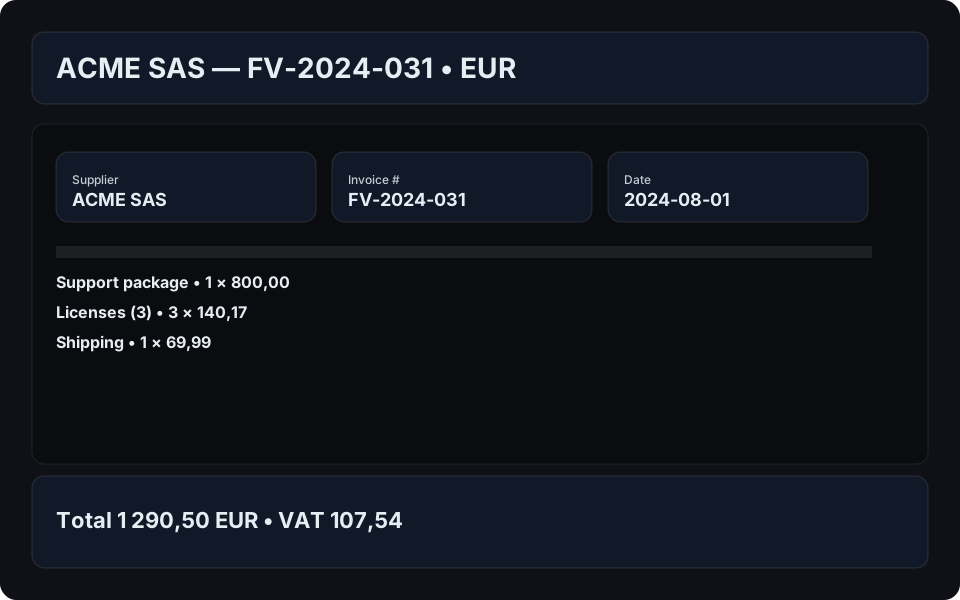
| Description | Qty | Unit | Amount |
|---|
Business value
This type of automation first reduces manual workload and limits errors caused by re-entry. It also improves data standardisation, making checks, consolidation and downstream use easier.
In practice, the value lies not only in extraction itself, but in making the data immediately reusable within a wider process: accounting, operational monitoring, control or reporting.
From demo to enterprise use
Thresholds, validation rules and access levels depend on the accounting process and the associated risk. They must be tested on a representative sample before any production automation.
Going further
This use case can form part of a wider chain: document automation, data pipeline ingestion, operational control or preparation of a dashboard output.
This also makes it a useful meeting point between automation, data structuring and broader analytical uses.